配置SDK出现格式错误
问题描述
在DevEco Studio中,将Build-profile.json5配置文件中的HarmonyOS SDK版本配置为4.0.0(10),示例如下:
{
  "app": {
    "products": [
      {
        "name": "default",
        "signingConfig": "default",
        "compileSdkVersion": "4.0.0(10)",
        "compatibleSdkVersion": "4.0.0(10)",
        "targetSdkVersion": "4.0.0(10)",
        "runtimeOS": "HarmonyOS"
      }
    ]
  },
  "modules": [
    {
      "name": "entry",
      "srcPath": "./entry",
      "targets": [
        {
          "name": "default",
          "applyToProducts": [
            "default"
          ]
        }
      ]
    }
  ]
}
总是出现如下格式错误问题:
> hvigor ERROR: Schema validate failed.
  Detail: Please check the following fields.
> hvigor ERROR: BUILD FAILED in 12 ms
  Process finished with exit code -1
解决方案
-
将...\SurvivorProject\hvigor路径下的hvigor-config.json5文件修改成如下:
{
  "hvigorVersion": "file:../dependencies/hvigor-3.0.2-s.tgz",
  "dependencies": {
    "@ohos/hvigor-ohos-plugin": "file:../dependencies/hvigor-ohos-plugin-3.0.2-s.tgz",
    "rollup": "file:../dependencies/rollup.tgz",
  },
  "execution": {
    // "daemon": true,                          /* Enable daemon compilation. Default: true */
    // "incremental": true,                     /* Enable incremental compilation. Default: true */
    // "parallel": true,                        /* Enable parallel compilation. Default: true */
    // "typeCheck": false,                      /* Enable typeCheck. Default: false */
  },
  "logging": {
    // "level": "info"                          /* Define the log level. Value: [ "debug" | "info" | "warn" | "error" ]. Default: "info" */
  },
  "debugging": {
    // "stacktrace": false                      /* Disable stacktrace compilation. Default: false */
  }
} -
将DevEco Studio开发套件中的depenencies文件夹拷贝根目录下。
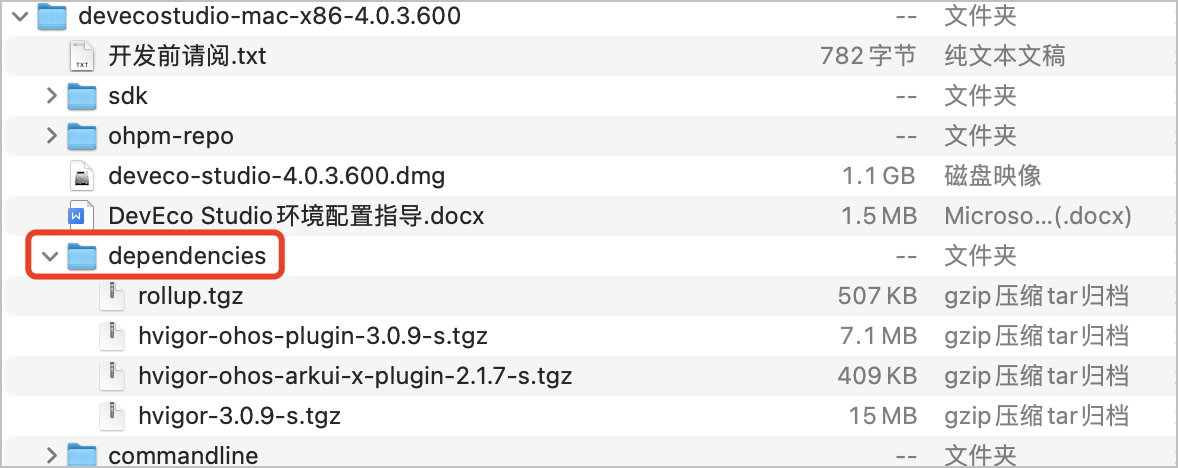
-
在DevEco Studio菜单栏选择“File > Sync and Refresh Project”更新项目。
-41271e5fd048ac577753353c19279dd8.png)